Monday, 4 April 2016

25 Best Email Autoresponders to Setup Followup Messages

Auto-responders play a very important role inEmail Marketing and newsletter broadcasting. We can send emails or updates to the subscribers automatically without the need to login to the email account. We can use Autoresponders to send a welcome email or a greetings email or login details for the membership site setup.
We can even send an email through our email system when someone clicks on a particular link, and the link forwards the Autoresponder newsletter. We have different Autoresponder service but all have the same procedure to setup automated response.
  • To create and manage the Autoresponders go to “Lists” in particular service
  • Select the mailing list we need to create auto-responder for
  • Now click on the “Autoresponder” link from the List Options.
  • It will direct us to the Autoresponders settings page follow the instructions carefully and save it.
This will take you to the Autoresponder creation page where we will need to define the Autoresponder name, messages and the schedule to send the Autoresponder. We can also have to create our Autoresponder email which will be sent to the subscriber.
We have number of Autoresponder service providers I have listed 25 best Autoresponders for membership site creation, Product launch funnel setup and other email marketing techniques.

1. Aweber Autoresponder Service

Aweber is one of the top Autoresponder service providers. It is widely known by all the internet marketer and product owners. The main feature it has a very reliable service at very formal rates. This is a great option if you really want a professional Autoresponder that is famous among the people. Currently aWeber offering a $1 trial for one month here we can test out the full features of the Autoresponder service. It is strongly suggested that you watch the Video Tutorials on Aweber before you decide to sign up any Autoresponder service.

aWeber Autoresponder Service

2. MailChimp Autoresponder Service

MailChimp is another popular email marketing and Autoresponder service. It is the free service for initially we can send 12 email broadcasts per month. Once we have reached the certain number in MailChimp account it will charge for monthly charges.
MailChimp helps us setup email newsletters and follow up message and integrate its services to the membership sites we already use, and we can track the results. It’s like the own web publishing platform.

MailChimp Autoresponder Service

3. iContact Autoresponder Service

iContact is another popular Autoresponder service its prices are very competitive and definitely worth considering. We can take a 30-day free trial to verify the email Autoresponder and newsletter service.
Every online marketer knows how improtant is to maintain an email marketing list to promote products and services. iContact has plans for marketers to get it done with their list. No matter about the list size, we have options to sent the newsletters with 99 percent delivery and real-time reporting & tracking.

iContact Autoresponder Service

 4. Constant Contact Autoresponder Service

Constant Contact email services provide easy to use service the Autoresponder service. They provide an email marketing service with 400+ customizable newsletter templates .And also it has the option to insert text HTML code into the emails for special formatting.
It has a 60-day-free-trial with this email marketing service. Constant Contact also offers extra features like videos, images, blog content, Autoresponders, surveys and newsletters.

Constant Contact Autoresponder Service

 5. Get Response Autoresponder Service

Get response provides free Autoresponder with Advertisements. Get Response is probably the most powerful Autoresponders among others. We can send personalized marketing messages and follow up messages and newsletter services. Free trial is also available in get response Autoresponder system.

Get Response Autoresponder Service

6. 1Shopping Cart Autoresponder Service

This is an all-in-one marketing solution apart from the Autoresponder services they provide. They offer an email marketing platform with better delivery and it has a built-in shopping cart and can set up affiliate promotions and payment options also. It is a good service for the people who want o use Autoresponder service with payment options.

1Shoppingcart Autoresponder Service

7. Infusion Soft Autoresponder Service

Infusion soft email marketing services makes our sales and marketing simple. It has many options to send newsletters and sales letters by bringing together. It is a simple system which built exclusively for small businesses. This infusion soft Autoresponder system has news letter tracking and subscriber management also.

Infusion soft Autoresponder Service

8. Interspire Autoresponder Service Service

Interspire Email Marketing supports unlimited autoresponders and email broadcasting service that can be used to automatically sent emails to the subscribers at specified time in the auto responders. Emails can be sent based on subscriber preferences such as age, sex and location, and everything is done using the interspire autoresponder system.

Interspire Autoresponder Service

9. PLR Newsletters Autoresponder Service

PLR Newsletters provides high quality, customizable news letter service provider. It is useful email marketing service for the content in hot niches, we can plug in to any Autoresponder with a few clicks of mouse. Easily build multiple responsible opt-in lists with this Autoresponder system.

PLR newsletters Autoresponder Service

10. Auto Response Plus Autoresponder Service

Auto Response Plus is one of the best sequential Autoresponder software. It is easy to use and install the Autoresponder integration with the customer website. It can provide faster automated follow up messages for the product launch funnel setup and we can easily setup newsletters with this email marketing system.

AutoresponderPlus Autoresponder Service

11. Sendfree Autoresponder Service

It is a Free Autoresponder service, also doubles up as a free targeted email advertising tool for its customer. We can also get to place Free Ads in other Member’s Autoresponders. We can setup follow up messages easily with this system.

Sendfree Autoresponder Service

12. MailiGen Autoresponder Service

This is a feature rich Autoresponder and email marketing system. It has the ability to build multiple subscriber lists, create and send newsletters, It has the options to survey the subscribers and analyze results for optimum performance.  It comes up with 30 day free trial.

Mailigen Autoresponder Service

13. List wire Autoresponder Service

Listwire is one of theFREE autoresponder and internet marketing service on the web.  Listwire can meet all strategies of email marketing and newsletter needs and automated follow up email setup options.  It makes effective email marketing simple. Listwire has many features like subscriber management and email autoresponder system that makes it easy to create, and send effective email marketing campaigns.

Listwire Autoresponder Service

14. QuickTell Autoresponder Service

QuickTell  is another email Autoresponder service it has taken the pre-programed follow-up method to new level and created a new leader in this field. For $20 per month, we can have unlimited Autoresponders with up to 20 follow-up messages per Autoresponder list. Also included, a daily log we can easily track the traffic.

Quicktell Autoresponder Service

15. Traffic wave Autoresponder Service

Traffic wave is another Email Marketing and AutoResponders service provider to build a successful online business. It comes up to the market with 30 day free trial for its full features usages. Find out what thousands of businesses around the world are discovering and make your business to be sucessfull.

Traffic wave Autoresponder Service

16. 1MerchantCart Autoresponder Service

1MerchantCart is a complete merchant solution with Autoresponder service. It has other feature for the merchants shopping cart, affiliate system, email management, product management, ad trackers and much more. All features in one system 1MerchantCart eCommerce Suite have combined all of the most powerful tools for an online business into one amazing business package.

1Merchantcart Autoresponder Service

17. Email Aces Autoresponder Service

Using Email Aces works like most other Autoresponder services, providing vital and important email marketing functions to Internet marketers. And the process automated and simple. The code used by Email Aces is their own code. This is one of the cheapest and one of the most professional Autoresponders. They have many schemes for any budget.

Email Ace Autoresponder Service

18. Vertical Response Autoresponder Service

Vertical Response has been around since 2001 handling email marketing and Autoresponders for customers worldwide, almost eleven years now. They pride themselves on their client friendly email marketing service and their flexibility when interacting with clients. Using Vertical Response, We can build an email marketing and Autoresponder list to perfectly meet our needs.

Vertical Response Autoresponder Service

19. SimplyCast Autoresponder Service

It has free and paid version of Autoresponder service get up to 1000 subscribers to keep in the free mode beyond the limit they will charge the customer. Features include Form Processing  in landing page, Online Form Builder, Autoresponder, and easy integration into existing members only site.

SimplyCast Autoresponder Service

20. Office autopilot Autoresponder Service

OfficeAutopilot is another real Autoresponder tool with blogging boggling features and Autoresponder service. The site is very user friendly and they get high performence. Apart from sending emails, we can set up post cards and can make pre-recorded phone calls. You can also process orders through their shopping cart. This awesome service does not come cheap but you can have a free trial in office auo pilot.

Office Autopilot Autoresponder Service

21. Turbo Respond Autoresponder Service

Turbo Respond is one of the leading and top professional Autoresponder and email marketing service available on the Internet. Every successful Internet Marketer and affiliate markets relies on Autoresponders to market their products and services to the customer via their email list. It has the features like newsletter broadcasting, Autoresponder emails and tracking system.

Turbo Respond Autoresponder Service

22. Mail Machine Pro Autoresponder Service

Mail Machine Pro is another Autoresponder system used in small businesses to stay connected with their customers and clients through edge email marketing technology. Our software makes it easy to manage mailing lists and create, send and track email newsletters and autoresponders.

Mailmachine Pro Autoresponder Service

23. Var Pro Autoresponder Service

The VarPro System is a complete autoresponder hosting solution, an all in one server-side software application. With VarPro you can host Free and Fee Based Autoresponders for the websites and landing pages. Many email marketers and internet marketer uses the Varpro auto responder system for their conversion on sales funnel.

24. Real Reply Autoresponder Service

RealReply pro autoresponder system also acts as a list manager and ad tracking system for the email marketing and newsletter broadcasting. It allows us to send 10 personalized follow up messages automatically to the subscriber so we can improve the sales conversion by these type of autoresonders.

RealReply Autoresponder Service

25. EZ-Response Autoresponder Service

Now we can send unlimited follow up emails with file attachments automatically from a domain of your own by EZ-Response autoresponder service.  We can setup many automated sequential letters as per our requirements and send them at the interval we specified in the Autoresponder system. Unlimited autoresponders, unlimited follow ups, unlimited users.

Ez Response Autoresponder Service

Conclusions

Autoresponders are a great way to automatically contact the subscribers, without having to physically appearance and write an email to each and every one of them. We have 25 different auto responder service providers in the above list.
The autoresponders automatically send a follow up email to customers who have subscribed newsletter in your website or from a landing page.
We can create and send an email course to the subscribers. Also we can schedule the course to be emailed over different days. For example, we could send our subscriber a new email every Monday or even a new email every day by the autoresponder system.
Send different emails to our subscribers automatically based on their preferences and their requirements by the autoresponder subscriber management options. Add if you know some other auoreponders to the list and Share your thoughts in comments Section.

Sunday, 3 April 2016

10 Web Site Design Mistakes that Reduce your Traffic from Google

When we talk about getting traffic from Google, most of us will know about Search Engine Optimization, or SEO or short. Most folks who have some knowledge about SEO will know that content and links are two primary factors that influence how much traffic your site can get from Google.  However, website design also plays an important role. Indeed, most forget that the codes which the website design are written in are also crawled and indexed by Google. If your code is not properly structure to maximize the SEO effects, you will missing out on potential a lot more traffic than you currently have.
Here are the 10 most common website design mistakes with regards to SEO.

Mistake 1: Too much Flash/Ajax effects

Some website designers tend to go overboard with Ajax or Flash to create lots of  effects. While they might interesting to view, they tend to:
  • slow down your website’s loading time, which is a factor in your Google ranking
  • reduce the amount of text that Google can index and therefore rank you for
So, if you like using these effects in your website design, don’t overdo it. Replace some of these effects with text and you will soon see a rise in your Google traffic.

Mistake 2: No labels for your images

Image search is now a huge source of traffic for many websites. These traffic is especially important for businesses who rely on images to sell such as restaurants, interior design, real estate etc. Hence, it is important for us to use a file name that uses the right keywords to describe the image. Don’t label them as picture1 etc. Use proper terms that people will search for such as Gourmet Hamburgers, Washington real estate, or bamboo flooring. By doing this simple change, you will see an increase in the traffic from Google image.

Mistake 3:  Too many sidebar links

One of the most important concept in SEO is pagerank or PR for short. PR determines how often Google crawls your website and how much content will be indexed. You cannot see PR but every website will have its own score. In terms of control we cannot hoardPR but we can channel them, using links, to the page where we want the most traffic. If your sidebar has too many links, you are effectively spreading your PR across too many web pages. This resultd in a large of pages that don’t get much search traffic, in contrast to a few strong pages that get lots of traffic.

Mistake 4: Keywords missing in navigation menu

Love it or hate it, SEO is about using the right keywords in your website. Most website designers don’t suggest good keywords in the navigaton menu, which is wasting another opportunity for the website to get more traffic related to these keywords. It is an art to choosing the right terms for your navigation. If you picked terms that are too competitive, the traffic from Google for these terms will be minimal. However, if you picked terms that have search volume but are not competitive, there is a chance for you to get more traffic from Google.
For example, if you create a website for a restaurant owner, using competitive keywords such as steak or hamburgers in the navigation menu might not lead to any increase in website traffic. However, if you used less competitive terms such as best burger new york etc, you will see more traffic from people searching for burgers in new york.

Mistake 5: Too little text

Google is a text machine, period. If your website design does not include sufficient space for lots of words to be included, you are missing your chance of getting more traffic from Google. I have seen some websites where there is literally no space for words. For example, portfolio wordpress themes tend to focus too much on the picture and have little space for words, especially on the homepage.

Mistake 6: Orphan your pages

I have seen some website design whereby it is almost impossible to locate a particular page because the website design has orphan the page by not linking it from any other pages. A common way of making this mistake is with a wordpress page. Unlike article posts, which tend to automatically appear on the front page of the blog section, a wordpress page will not be automatically linked to, unless there is a section in your website (such as your navigation) which automatically displays any new pages created. Once a page is orphaned, it will be difficult for Google to crawl and indexed that page.

Mistake 7: Flat architecture design

A flat architecture design means that all your links can be accessed via a central place like your home place. This runs into similar problems as mistake 3 i.e. too many links on one page. What your should do is to create navigational pages and then link to these pages through the homepage. Navigation pages are nothing more than a listing of all similar articles in one page. Such a solution is more elegant than trying to cramp every link into the homepage.

Mistake 8: Ineffective site description

Site description is the line of words that will appear beside your website in the search results. An ineffective copy will lead to less people wanting to click on that link and visit your website. I have seen cases where websites which are ranked second getting more traffic than websites ranking number one. This is simply because the site description of the number one site does not convey anything that draws people in.  When designing a website, pay attention to how you describe your site so that it is appealing for others to want to check it out.

Mistake 9:  Keyword stuff your pages

This is the opposite of mistake 4. Instead of using too little keywords, you keyword stuff your pages to the point where they appear everywhere i.e. navigation, sidebar, footer. Worst of all, your navigation links read like a spam list such as the example below
  • real estate in Washinton
  • real estate in New York City
  • real estate in Portland
  • real estate n XX city number
If you do this, there is a strong chance that the website will receive a penalty from Google that will reduce the amount of search traffic you will get from them.

Mistake 10: Updating your website design

This is a mistake made by many including myself. We tend to stick with the initial design because there is little incentive to change anything. However, it is important to note that as a site growing in both traffic and content, there is a need to update our website to improve its navigation and/or to update content and links. Failure to do so can result in Google giving your site a lower score.
For example, many sites that you were linking to in the past might no longer be around. Keeping these links alive is not only bad for your visitor’s experience, it is also bad for Google because their crawlers will end up with dead ends. If your website does this enough times, I believe the quality score of your website will be downgraded.

Many of the mistakes mentioned here can be removed with a little bit of effort. So, if you think your traffic from Google is not growing, go through this checklist to see if things can be improved.

15 SEO Tools to Improve Your Site

In discussing website marketing, there are several number of search engine optimization tools can be used, which are very helpful in this undertaking.
This is one of the most important undertakings that you can do to get online visibility, especially with the major search engines changing their algorithms all the time. Here are the SEO tools to improve your site and take it steps higher in SERP rankings.

1. Your Eyes

best-seo-tools While this is not one of the most popular SEO software today, your eyes can do a lot in helping you gain insights on the best tools to use. Look around a site and see why it ranks higher in the page ranking by going through its flows and how it works. Look for possible improvements that you can implement for your site and veer away from things that do not look good as well.

2. SEOmoz

seomoz The grandfather of best practices for SEO, and it is the professional account of SEOmoz that allows you to handle your SEO by giving recommendations as it daily analyzes your site regularly. Users can easily download a toolbar for free that will regularly displays the SEO metrics of different websites as you browse online; and provide other benefits as well including the help forum and the beginners guide to SEO.

3. IIS SEO Toolkit

The IIS SEO toolkit is a complimentary SEO instrument that lets you to examine the SEO aspects of your site from its URL, content, search engine spiders, and structure. It can clearly shows issues that you might have overlooked, for instance; when the link of a page is broken or if the title in the certain page is too long. In addition, you will see these errors with an X colored in red, so you can easily see and correct them.

4. Screaming Frog

It is another tool for SEO that comes in free and paid versions that you can download and install to your computer like MAC, it helps spiders or crawl your website’s CSS, links and pictures using from the SEO perspective. If you have other concerns like 302s, it sees that as well and share it with your developer so they will fix it. One of its good features includes exporting your Meta descriptions, page title, and links to Excel document to provide you a clear analysis to base its recommendations from.

5. Majestic SEO

SEMrush Offering a tough set of connection tools, this tool allows you to evaluate and check any domain in granular point. Some of its best highlights include site explorer so you can plummet down into any link; keyword checker for you to see how many times a keyword or phrase shows and provides the search level based on organic figures; and backlink history so you can discover the amount of backlinks given to a URL, domain, and sub-domain.

6. SEO Site Checkup

seositecheckup This is simple SEO tool that is easy to use as provides one field to populate as you key-in the link and go. The analysis of the site is done fairly quick and easy; while helpful clarifications and recommendations come in rollover help pop ups for each section and if the analyzed results return with results flagged as red marks; it will display complete directions and reasons as well as suggestions on how to resolve them.

7. Adobe Site Catalyst

Adobe Site Catalyst If you want to know how the traffic in your site has picked up year after year, this tool can help you do that and do other things as well such as helping you find the most lucrative channels through a site and identify where you visitors are leaving your website, so you can optimize its ‘stickiness.’

 8. Google Analytics

Google Analytics It is another no cost charge tool that is recommended for those who are into online marketing, Google Analytics allows you to understand what your website is doing on a daily basis. It can also let you see traffic spikes and identify    how it influenced your site before and after, as well as where is the referral traffic are coming from.

9. SEMrush

SEMrush For those who are doing a research in keyword based in competition , this is the perfect tool as it gives you intuitive information on certain keywords that actually drive traffic to your website. In addition, it also provides details about your competitor’s paid search keywords, traffic data, and ranking.

10. Google Webmaster Tools

This is not only free but is also very useful if you want to know how Google perceives the site that you own and manages. It can also make you alert of site issues such as 404s, as well as if it has been virused with malware. A great tool for site owners; it was devised to notify webmasters on how the Google bot is relating with their website.

11. Bing Webmaster Tools

This is another complimentary tool that allows you to see how your website is doing from Bing’s standpoint. It is fairly easy to use with a clean interface. On its main account dashboard page, you can select whatever site you want and see a quick statistics on clicks, impressions, pages indexed, and pages crawled with percentages account for net gain or loss for the week.

12. SEO Tool Set

SEO Tool Set If you are centering on redirects, this SEO tool can easily look at the header of the server and detect redirects and follows as well as points out problems significant to your site’s operation. It can also be very useful if you want to know how your contenders’ websites are doing.

13. Google Trends

It is an extra tool intended for keyword research that allows you to see the alternatives of a keyword or phrase, Google Trends can also be an enormous instrument to brainstorm content. This is also a great help if you want to generate or produce optimized content for advertising messaging and explore seasonality to find out how certain keyword phrase performs versus the other.

14. HitWise

While this is a paid tool, it gives useful details within your sphere by providing keywords in your space. It also provides daily rankings of the world’s most popular websites by monitoring the activity of the surfers, as well as the profiles, searches and charts of various websites.

15. You Get Signal

If you want to know how your competition is faring on their server, this is the best tool that allows you to see if they have place a new sub-domain before it commenced. Besides getting classified information, this will also help you investigate at their site and check their code to see how they are executing stuff, a great spy tool indeed.

Saturday, 2 April 2016

15 Facebook WordPress Plugins For Bloggers

Facebook is very strong way to promote your blogging and improve your readers. If you are the user of WordPress. you must looking for these stunning facebook plugin for wordpress. Installing these extreme plugin of facebook, you can easily share your posts automatically , re-tweet it. Last week , we covered the


Herein are 15 cool WordPress plugins for Facebook.


1) Feed Facebook, Leave Facebook

This plugin will Generates a separate partial feed for Facebook. Use it to
direct Facebook visitors to your blog while leaving your main full-text feed. If
you don’t know, how you can control the feed then use this plugin.

feed facebook leave facebook 15 Stunning Facebook WordPress  Plugins For Bloggers


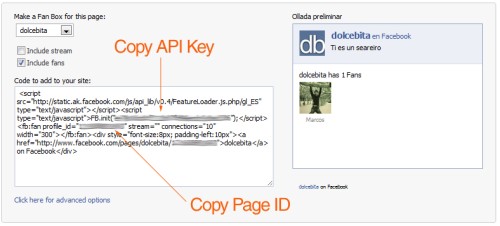
2) Facebook Fan box

Facebook fan box is mostly created by blogger. It will help you to increase
the traffic. Facebook Fan Box shows the  recent updates and fans, just activate
this widget or insert this line of code anywhere in your theme:

facebook fan box 15 Stunning Facebook WordPress Plugins For  Bloggers


3) WP-FacebookConnect

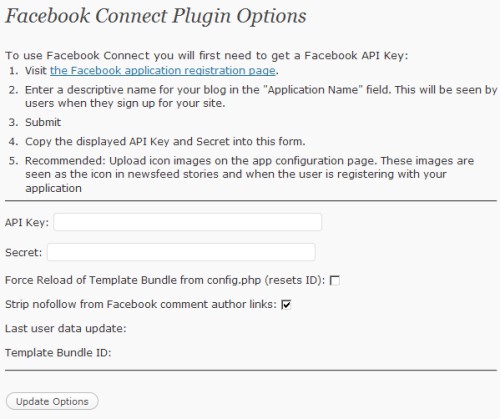
WP-FacebookConnect adds Facebook functionality to WordPress using the
Facebook Connect APIs. It offered the following options Single-signon with your
Facebook account, Publish comments to the newsfeed, Comment avatars display
Facebook profile photos etc

wp facebook connect 15 Stunning Facebook WordPress Plugins For  Bloggers


4) QuailPress

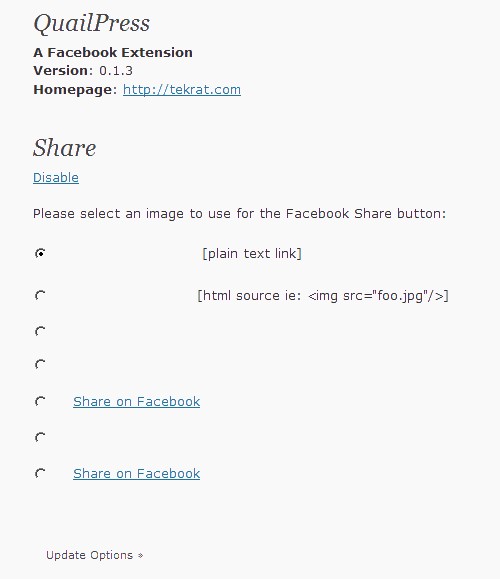
QuailPress allows you to integrate with Facebook Share so that users can
easily share your posts on their Facebook accounts.

quailpress1 15 Stunning Facebook WordPress Plugins For Bloggers


5) Gigya Socialize

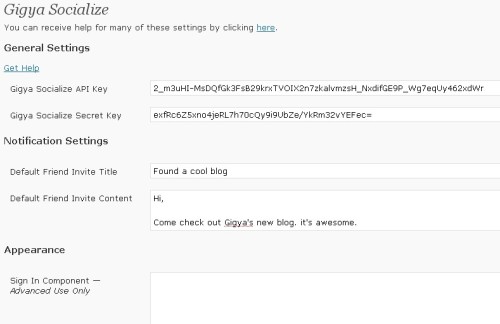
The Gigya Socialize plug-in aggregates authentication and social APIs from
Facebook Connect, MySpace ID, Twitter, Google, Yahoo, and AOL. just go to Gigya
website and get your API and Scret Keys to use this plugin.

gigya socialize wordpress plugin 15 Stunning Facebook WordPress  Plugins For Bloggers


6) Fotobook

Fotobook is a WordPress plugin that will link to your Facebook account(s) and
import all of your photo albums for use in your WordPress installation. It uses the Facebook’s API so importing your photos is a breeze.

fotobook 15 Stunning Facebook WordPress Plugins For Bloggers


7) Facebook/Twitter Status Updater

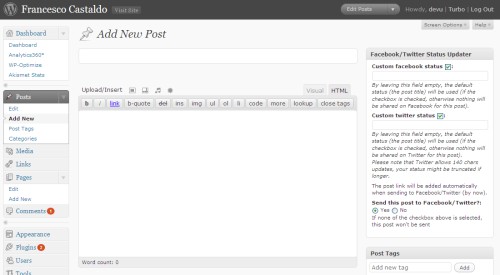
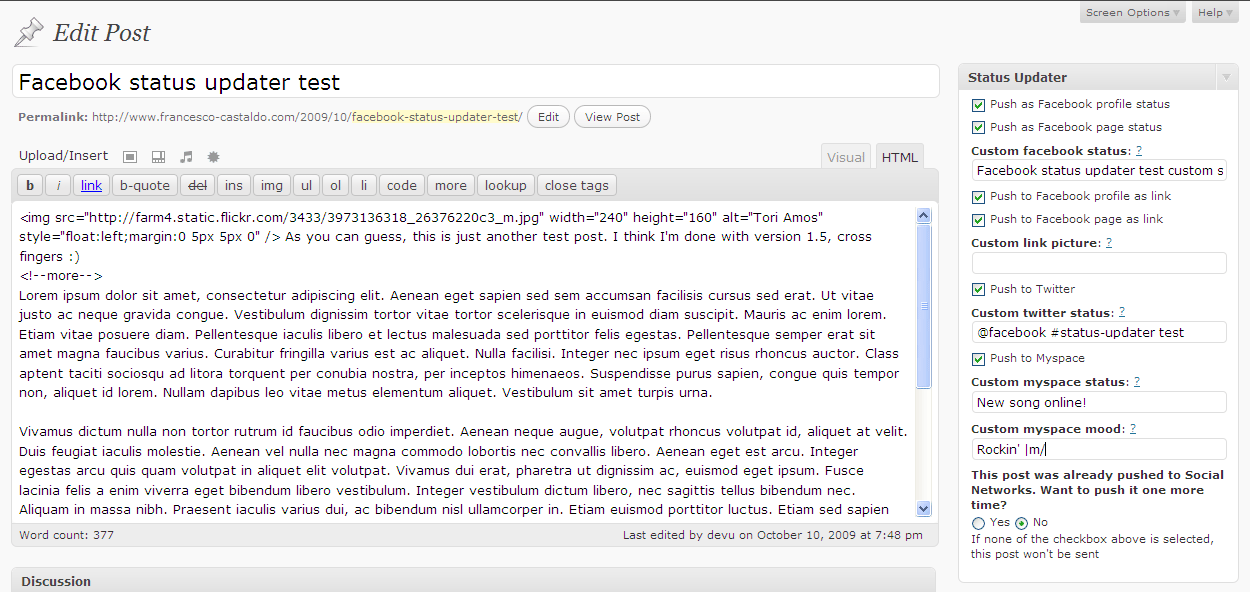
Facebook / Twitter Status updater is awesome plugin for
wordpress. It saved your time to  update your Facebook status / Fan Page Wall /
Group Page Wall / Twitter  / Myspace with every new post you publish on your
blog.


facebook twitter status updater 15 Stunning Facebook WordPress  Plugins For Bloggers


8) Wordbook

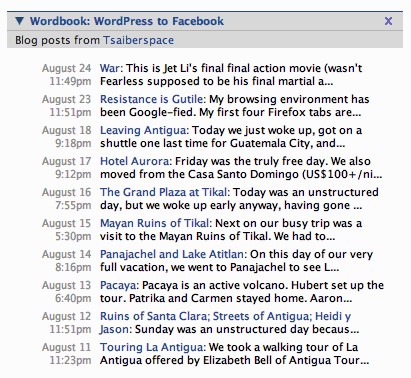
This plugin allows you to cross-post your blog posts to your Facebook Wall. Your Facebook “Boxes” tab will show your most recent blog posts.


wordbook 15 Stunning Facebook WordPress Plugins For Bloggers


9) JanRain RPX

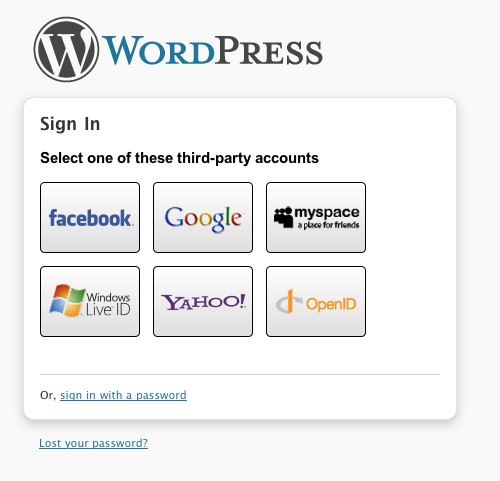
The RPX wordpress plugin lets you use OpenID, Facebook Connect, Twitter, MySpace, Google, Yahoo!, and Windows Live ID authentication on your blog.

janrain rpx 15 Stunning Facebook WordPress Plugins For Bloggers


10) Facebook Posted Items

This plugin fetches posted items from Facebook and displays them in an unordered list with proper links and comments. This plugin displayed your posted items of facebook in your wordpress.

facebook posted items 15 Stunning Facebook WordPress Plugins For  Bloggers


11) Facebook Dashboard Widget

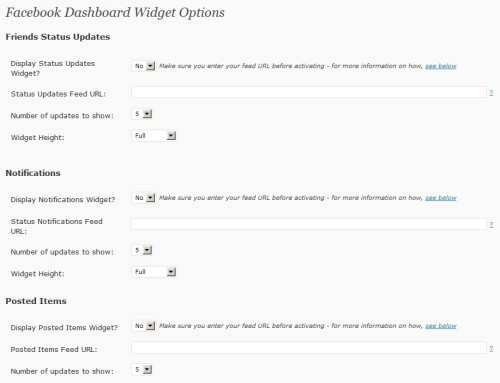
This is another simple plugin for wordpress that pull and display your friends of facebook. It notifications you at the wordpress as admin login and you can see the updates of your facebook friends status without login the
facebook.


facebook dashboard widget 15 Stunning Facebook WordPress Plugins For Bloggers


12) Add To Facebook

This  plugin adds a footer link to add the current post or page to a Facebook Mini-Feed. While the plugin is activated a link will appear after the content of the post with the text “Share on Facebook” or the Facebook icon or both. Clicking this link will bring the user to the Facebook site. If the user isn’t logged in they will be prompted to do so. Once logged into Facebook the post will be added to the Mini-Feed of the account.

add to facebook 15 Stunning Facebook WordPress Plugins For  Bloggers


13) Facebook Comments

Facebook comments is a WordPress plugin that will import comments from your
facebook notes back into your wordpress blog.


14 ) StatusPress

This plugin takes your Facebook status updates and places them in your
WordPress blog.


15) Facebook Sharer

This plugin adds a link within each blog post to share blog posts on FaceBook.

How To Get Traffic To A New Blog ?

 Most of the newbie bloggers quit their blogging just because they don’t see any traffic from their blog(s). Even who have started their blogging career long time ago don’t see much improvisation in their traffic.

Why?

Because they don’t follow few tips which has to be followed to Get Traffic to A New Blog . 

How can any blogger Get Traffic to A New Blog?

Though there are many ways to Get Traffic to A New Blog, the most important factor is NETWORK. The more network you have the more traffic you’ll get.
The best way to build a network around your blog is: start interacting with others using
  • Facebook
  • Twitter
Why I’m mentioning only these two sites because, it’s easy to spread your word and follow other bloggers easily using this social media sites and  Get Traffic to A New Blog.

How to Get Traffic to A New Blog ??

Following are some EXCEPTIONAL ways to bring traffic to a new blog (0r) any blog.

1. Blog Comments:

Comment on top blogs in your niche try to be the first 5 commenters.
Tips: Subscribe to their RSS feeds.
Don’t spam their blogs by writing one liners. Add value to your comments.
If you want to get traffic daily this is the best way to go.
Type “your niche + blog” in google to know which are the top blogs in your niche.blogging blogs
Ex: “blogging + blog”
Read : Why You should comments on other blogs?

2. Network with others using Facebook and twitter

Facebook: Join in Groups.. Promote yourself out there.. BTW facebook alone is giving me 100+ leads daily (even without promoting everyday!). Ammar Ali is also getting huge traffic from Facebook 😉 . So don’t neglect bringing Facebook traffic to your blog.
You may find it difficult in the beginning but when you start promoting others content and when you get to know each other on Facebook, it becomes very easy!
PS: You can join our group ‘Everything About Blogging‘,  and can promote your blog there!
Twitter: Follow top bloggers in your niche and follow their followers. This is the simple yet effective way of increasing your targeted twitter followers. Once you have done this, you can tweet your new articles and ask your followers to retweet it.

3. Video Marketing:

Create a 2 min.video and add your blog link at the starting
Submit them to YouTube, metacafe etc.
Tools to use: Use Screenr to create free videos
Read : Is Video Blogging Worth Trying?

4. Spend time on writing detailed articles.

Never assume that you can bring quality traffic without much efforts.
You need to differentiate yourself with others to become successful. It takes time to create content, I agree but you shouldn’t spend whole time creating only normal or average 600 words posts.
Spend time to create great content.
Write detailed posts with 1000 or 1500+ words once in a while. If you’re not a full time blogger like me, at least try to create detailed posts once or twice a month.
So that you can grab others attention and you can show your blogging expertise to your readers.
It’s really important for you to create killer articles regularly to survive in blogosphere. This can bring your quality traffic from other sites or search engines.

4. Don’t forget SEO

Most people say forget about SEO (Search Engine Optimization) when you’re just starting out.SEO TACTICS

I think that’s the dumbest suggestion!

You need to focus on what keywords to use and how much keyword density you should maintain in your content to get search engine traffic to your blog.
It’s extremely important to bring organic (search engine) traffic to your blog. Because it’s free and highly effective!
Make sure that you’re not keyword stuffing your content. It makes your readers hard to digest what you’re saying in your articles.
And do proper keyword analysis before you’re writing the articles. Then embed them into your posts. If you’re a beginner then this is enough! Don’t go beyond, you’ll better understand about SEO when you’re spending more time on blogging.
Don’t Miss : 5 Basic Pillars of Creating Successful and Profitable Blog!

Conclusion:

Always try to retweet and promote your fellow bloggers before asking them to promote your content. This can make others to promote your content sooner or later and you will have high chances of getting their attention if they find it useful. 
I dint recommend guest blogging here in this post. Major reason is without having any online reputation you can’t cope up with other bloggers to get accepted your guest posts. When they reject you, you’ll feel down to submit another guest post to them.
So, focus on building a network by blog commenting, writing great stuff and social media networking using above tips.
Have I missed any other way to  Get Traffic to A New Blog? Take your action by commenting below ;)

Friday, 1 April 2016

7 Powerful ways to Increase Website Traffic !


web is filled with tips about increasing page rank  and Increase Website Traffic.
Some stuff is worth reading and some is just crap, but believe me, this post is really gonna help you to increase website traffic, as I have spent two rare weeks researching for this post.

Particularly because it is just not an ordinary post, it is the collection of my experience in blogging and blogosphere.  So lets know what really is blog traffic? and how to effectively Increase Website Traffic Free in upcoming year 2013

How to increase website traffic? What is it?

It refers to the number of people who view your blog more or less often. It should be called “The Mother of Blogging” because if you have no traffic in blogging,  you are nothing in blogging, just as a mother is important for a baby.
Increase Website Traffic

7 Powerful Ways to Increase Website Traffic:

Without wasting more time I will be going straight forward share tips to increase website traffic. These tips will surely help you to increase your traffic in upcoming year as well!

1. Create a Powerful Social Media Strategy:

Social Media Strategy is the Major Weapon in success of a blog. If you build right Social Media Strategy and use it at right times and right places, you could certainly be in the Winners.
Some Social media tips are given below which are extracted from the articles of highly renowned Social Media experts. You too can follow them to increase website traffic for free
  • Post more and more engaging stuff. Stuff that call the people to comment more and more and like your posts more and more.
  •  Create your presence in all major Social Media websites and link your blog to them.
  •  Must include social media sharing buttons to your blog posts and main blog page.
  • Share your new posts regularly on Social Media websites.
  • Don’t just share new posts, but also give at least one hour a week to organize your older posts and share them to Social Media.
  • Try to build more audience on Social Media.
  • Use browser extensions or other SEO tools to save your time while sharing on Social Media.
The following Social Media Sharing websites are Must to Post websites:
  1. Facebook
  2. Twitter
  3. StumbleUpon
  4. LinkedIn
  5. Google Plus
  6. Digg
  7. Technorati
  • Give your 40% available time to Social Media sharing and Social Media audience building. It’s important and in this way you can increase website traffic within very less time.
Remember! The more you use Social Media to get your website more traffic, the more quickly you make your blog renowned to the world! 😉

2. Post Quality and Regular Content:

Another one of the most essential ways to Increase Website Traffic is related to your blog content.
As far as the blog content is concerned, it should have the following two qualities:
  • Always post Quality Content
  • Post your Content Regularly
Regular posting assures your continuous presence on the blogosphere which results in good search engine linking and higher PRs and Quality Posting assures your loyal visitors.
Loyal visitors are those visitors, who after visiting your blog once, find it useful and Bookmark it to visit it later. These visitors are the much needed asset for the success of a blog.
There are many methods of increasing loyal visitors, I will post them in a later post.
  • 12 Tips For Writing Engaging Content For Readers

3. Let not Alexa & Page Rank divert Your Attention

Many new Bloggers, (including me too when I was very new) wasted their precious time in judging there Alexa Rank and Google Page Rank. This is the first step of disaster for a Blogger.
If you follow the same pattern, you should overlook it as soon as possible.
Remember a few things:
  • No blog can get Alexa Rank of 1000 within a month nor a Page Rank of 6 within a month.
  • Just keep these things aside and Focus on QUALITY of your content and REGULARITY of your content.
  • Its simple! Just stick to the basics. Don’t try to be over smart. Analyze some successful blogs and see their writing and presenting methods. Try to furnish your writing skills.
  • Never ignore Social Media integration. As it is the biggest secondary too to increase website traffic, it is atraffic generation tool.
It is nice to see our blog getting more and more increased in Alexa Rankings but what you need is “Traffic” which could only be generated by sticking to the basics.
Focus more to Increase Website Traffic and When you get traffic, you’ll automatically get higher Alexa Rank and Google Page Rank.
  • Top 15 Killer Tips To Increase Page Rank!

4. Involve Yourself with the Blogosphere:

It is very important, as Blogosphere community is a great source to Increase Website Traffic.
Be yourself known to the blogosphere by following some of the methods given below:
  • By commenting on blogs (especially those with CommentLuv enabled)
  • Retweeting some Tweets of top ranking / high follower bloggers, it might also make them to Retweet your tweets too.
  • Making strong presence in all major social media websites.
  • Tweet different good articles from different blogs giving “via @BlogOwner” link.
  • Guest post quality articles.
  • Try to make personal contacts with some of the leading bloggers, so that they may share their experiences with you.
It will be my pleasure if you share some more ideas regarding involving with blogosphere in this Increase Website Traffic post in comments. :)

5. Give Attention to Website Theme & Loading Time:

Nice presentation of blog design and faster loading are the two factors which assure the number of loyal visitors to your blog.
If your blog has a scary look and navigation is difficult, your visitors will start neglecting your website even if it appeared in Google search page one. If you want your visitors to visit again and again, then you will have to choose a simple and easily navigatable design for your blog. It’ll surely help you to boost traffic and also increase website traffic with ease.
Pageload determines the time in which your page loads completely. It also needs to be good if you want your blog to be visited by a visitor every now and then and thus create loyal readers.
Pingdom Pageload Checker is a very good tool for Pageload information. It completely analyzes the performance of your blog and lets you measure each and every aspect of your blog/website. It is really a tool worth trying.

6. Add & Optimize Social Media Sharing Buttons:

Increase Website Traffic
Another way to increase website traffic is to add Social Media Sharing buttons allow your visitors, as well as you to share your stuff on Social Media. These buttons are added to many blogs. But the correct placement of the buttons is what matters.
Try to add the buttons on the eye-catching spots. For example just at the end of post. The reader who reads till the end will surely like to share it to others.
Add an inspirational text above the buttons like:
Found this article beneficial??? Share This to Your Friends. One of Your Friends Might be waiting for Your Share
or
Share This Post and Help Your Friends
Or you could use some better attention diverting sentence. Its absolutely upto you intelligence. (Sometimes, you also need to be a bit gifted to be successful, but don’t worry, not in all the cases)
Also focus on the color combinations of your sharing buttons. Set them perfectly according to your blog template design so that they shout the visitors to share your post. 😀
  •  Top 10 Best Social Sharing Plugins For WordPress

7. Assure Loyal Readers by Creating Mailing Lists:

A strong mailing list has always been an ingredient for a successful blog. Mailing lists are a major source of assuring continuous traffic and they will surely help us to Increase Website Traffic. A person reads your blog post, likes it and wants to get updated from your blog.
What could he do??
No worries mate! Offer him something to do by adding a nice gadget for Email Subscription in well-optimized place.
The more subscribers you get to your mailing list, the more traffic you get to your blog and thus it will help you to increase website traffic
  • Top 10 Best Ways To Build Up Mailing List

That’s it! How do you increase website traffic?

These were the 7 Powerful Ways to Increase Website Traffic in 2013. So it is a very DENSE EXTRACT and might well help you. And I am sure these tips really gonna help you in the next upcoming year 2013 if you implement them rightly.
If you disagree with any of my point to Increase Website Traffic or want to improve myself, your suggestions are most welcome. I will never dislike your comments (even critical ones) but please be ethical!

5 Ways to Make Money without Adsense

You adsense is BANNED ? Why you blog if you don’t have adsense ?
I know you are thinking the same as I mentioned above  But to be honest I don’t like adsense too much that’s reason I removed adsense from this blog. But if your don’t have adsense than you don’t need to worry about that as today we are discussing Top 5 Ways to Make Money without Adsense..
make money without adsense
The dominance of Adsense in the ad serving market has seen it assuming tyrannical stand with the rejection rate for ad publishing applicants deplorably higher. However, with a plethora of other earning options available, there is no cause for heartbreak for gullible users.
We discuss top five sparkling alternatives to make money without adsense here. 😉

Make money through Affiliate marketing

Affiliate marketing can become a veritable cash cow if capitalized upon ethically. One is required to promote the products of merchants or entrepreneurs and bag a handsome commission on each sale made at an attractive 20-70% depending upon the financial strength of the merchant. Superior quality products with strong brand presence, credibility and potential to deliver what is promised should be vigorously promoted through blogs, writing high quality articles, building a massive email list, participating in discussions on serious forums and writing product reviews. Low quality products should never be promoted through spamming and illegal blackhat techniques or one will face serious loss of reputation with fatal repercussions.

Make money selling ad spaces

Blogs dedicated to promoting high end products are sure to attract the attention and interest of marketers who would like serious audiences for their products on their sites. Selling banner ad spaces on blogs for a niche product with promise of diverting good amount of organic traffic will bring one a handsome chunk of income. The share of revenue will be comparably higher than Adsense as Ad networks sell the advertising space on blogs at about a whopping discount of 90% to marketers owing to profuse amount of selling space available with them. The potential advertiser should be allowed to offer their best price to fetch higher revenue and make money without adsense.
Use OIO Publisher plugin for WordPress to sell ad spaces with ease.

Make money Using Best Adsense Alternative

Adbrite and Chitika have emerged as the best alternatives to Adsense when it comes to displaying context sensitive ads. Their payouts are highly competitive. Adbrite shares the revenue in 75-25% in favor of blog owner. Chitika is the leading impulse merchandising company which gets the niche ads displayed through customized and novel ad boxes that deviate radically from accepted industry standards and complement the existing ad serving scenario. Chitika is the golden geese for ad publishers and the platform can be capitalized to earn daily ad revenue. The action based pay per call ads pay to publishers somewhere between 2 to 20 dollars per action. Adbrite and Chitika have offered unsuspecting users a new avenue to make money without adsense.
Here are best adsense alternatives that pays!
  • Bidvertiser
  • Chitika

Make money by Writing Paid Reviews

Millions of people across the globe read blog posts every day. A company can generate tons of qualified traffic and have the spotlight on its products when it pays for paid reviews to be posted in context sensitive blogs pertaining to their niche products. This triggers word of mouth advertising, enhances link popularity, brand credibility and product exposure and also provides a chance to understand peculiar consumer tastes and behavioral trends. Ultimately the product page experiences a significant rise in search engine rankings. The companies pay handsomely to have their reviews covered in blogs with significant number of qualified visitors. One can earn amounts equivalent to that of adsense and this is slowly turning out to be a better alternative to make money without adsense.
Here are best websites you should join to get paid reviews offers quickly.
  • ReviewMe
  • PayPerPost

Make Money by Using In Text Ads

Publishing ‘In text ads’ on your blog by invoking the services of Infolinks will help in monetizing the site with highest revenue share from contextual in text ads. Only relevant ads are delivered which essentially improves the conversion rate and boosts the earning potential. You can join following sites to monetize blog using in text ads;
  • InfoLinks
The pay per click ads can be easily integrated in the site and bring about a jumpstart in your earning and a new opportunity to make money without adsense.